Marketing Rule review software
Every advertisement, reviewed against the rule that governs it.
Drop in a deck, a one-pager, an email or a landing page URL. Luna reads it and comes back with findings, each one saying where in the piece it sits and citing the rule it fails. You decide what to do about them.
Included in Solo (10 reviews a month), Firm (100 a month) and Firm Plus (unlimited)
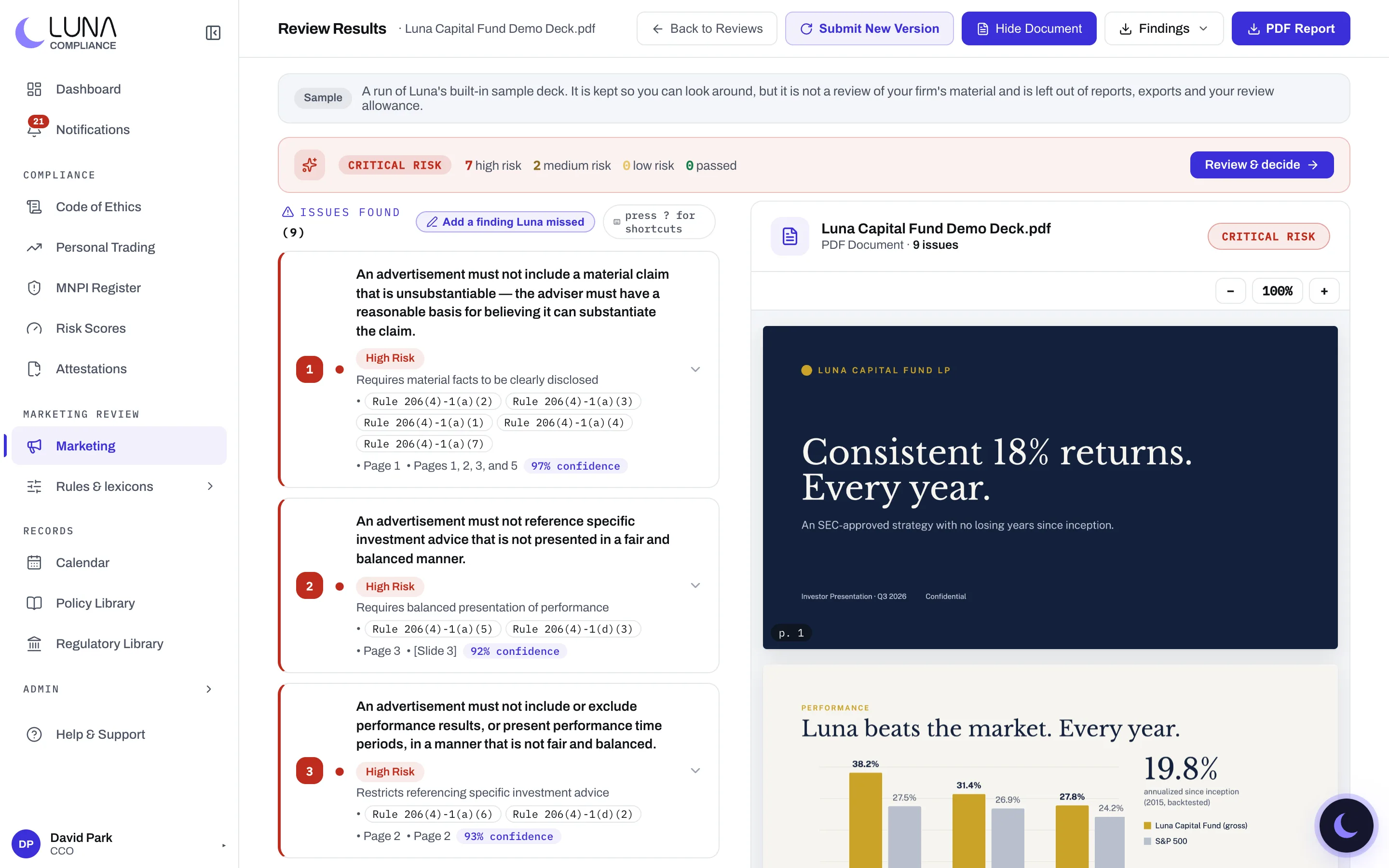
A screenshot of the product, with a demonstration firm’s data.
The Marketing Rule prohibits an advertisement that is materially misleading, that presents extracted performance without the total portfolio, that discusses benefits without fair and balanced treatment of risks, or that uses a testimonial without the required disclosures. It also makes the advertisement itself a record you have to keep, alongside the review of it.
What it does
Three ways in
Upload a PDF, PowerPoint or Word file. Paste text for a social post or an email. Or give Luna a URL and it fetches the page. Whatever you submit is kept as the record.
Findings located in the piece
Each finding names the rule or policy it comes from, where in the piece it sits, and a confidence score. In a PDF or a slide deck it carries the page or slide, and clicking it jumps the viewer there, so you are not hunting for the sentence.
Severity you can triage by
Findings come back as high, medium or low risk, with a risk level for the piece as a whole. When one problem breaks several rules it appears once, citing each of them, so the list is the problems to fix rather than every check that failed.
Your lexicons and your disclosure rules
On Firm and Firm Plus, beyond the Marketing Rule, Luna checks the terms your firm has banned and the disclosures your policies require. Both are yours to edit, and a finding always says which source it came from.
Versions, threaded
Submit a revised piece as a new version of the original and Luna keeps the chain. Any earlier version reopens in place with its findings, which is the history an examiner asks for.
Comments and a decision of record
The submitter and the reviewer can talk on the review itself rather than over email. The CCO's decision and notes are recorded with attribution and a timestamp.
False positives, flagged
Mark a finding as noise and it dims, with the flag attributed to whoever set it. The flag is kept as a quality record; it is not fed back into a model without your written agreement.
Your firm's own rules, and only those
Beyond the Marketing Rule, a review applies only the rules your CCO has confirmed. Luna can propose them from your compliance manual or your filed Part 2A, quoting the passage each comes from, and nothing applies until the CCO says so.
Disclosures written for you
Each finding shows sample disclosure language that fixes it, already filled in with your firm's name, registration and fee. For a state-registered adviser, a testimonial in a jurisdiction that still bans them is flagged with the state rule cited.
Two approvals when you want them
On Firm Plus, require two approvals before a piece is cleared: one of them the CCO's, or two different people. Nobody approves their own submission while someone else can.
The exam package, one download
Record each piece's category and every time it went out. When the examiner asks, download the materials, the presentation log and the review log together in one file.
Exports
A CSV of findings for working through, or a PDF report of the findings and the decision for the file. The original document stays with the review and downloads from it, because the rule expects the advertisement retained with its review.